
As you might have noticed, our library system’s catalog is changing to a new interface.
This change is being made to meet web accessibility standards that assure everyone can use our catalog system.
Unfortunately, the new catalog is missing some functions that the old catalog had, and has other problems that are still being fixed.
For the foreseeable future, the old catalog will still be available for public use alongside the new catalog.
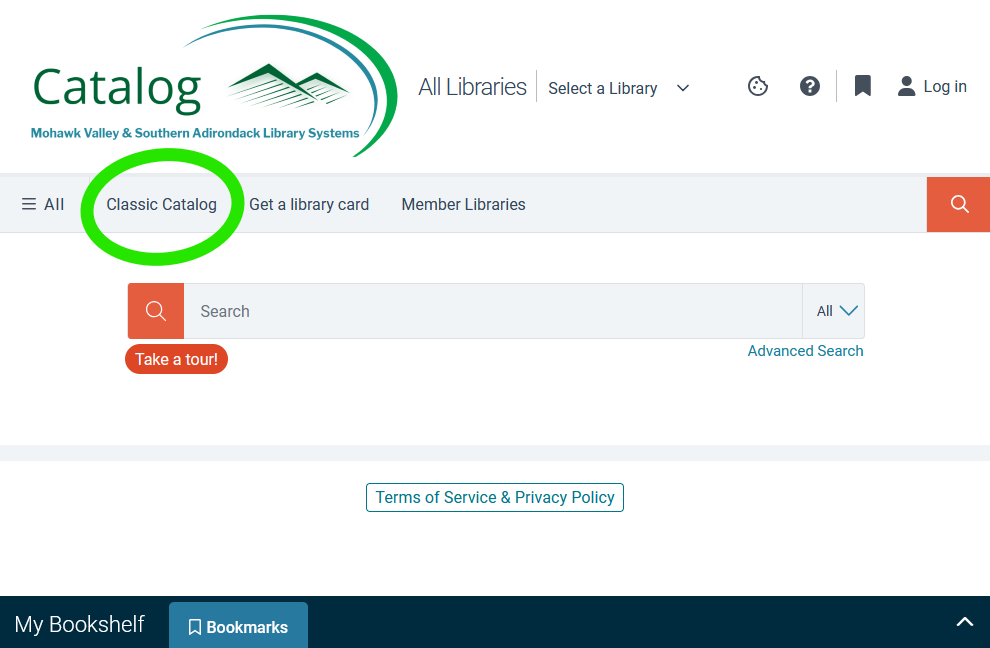
To switch from the new catalog back to the old one, select “Classic Catalog” from the menu bar, and it will take you to the old catalog at pac.sals.edu.
To switch from old to new catalog, click on the image on the homepage with text reading “Explore your Library’s New Catalog”, and it will take you to the new catalog at search.sals.edu.
If you have any problems with the new catalog, let us know by emailing roundlake@sals.edu.
Known problems:
- Search results are for all of the libraries in the system, not one location
- Solution: Use Filters in the left sidebar to set the Location to Round Lake and/or Round Lake-Malta Branch.
- Screen is greyed out and can’t select anything
- Solution: Dismiss cookie bar on bottom of screen, or manage & confirm cookie settings from bar.
- Saved Lists from the old catalog are not transferring to the new catalog.
- Solution: Use the old catalog to access your Saved Lists for now.
- Login button disappears in mobile view
- Solution: Click on the up carrot ^ in the bottom right of the screen for an alternative way to sign in.